
User Defined API - Get data from data sources (Part 2)
Overview
This is the second part of my blog post about User Defined APIs. This one is dedicated to running mode Get data from data source. While they are easy to use in general, I want to highlight a few issues I’ve run into, so that you are aware of them.
Series
If you have no idea what User Defined APIs are and why you should change this, you should start with the first part of this series:
- Overview
- User Defined API - Get data from data sources
- User Defined API - Actions on a workflow instance
- User Defined API - Execute automation
Get data from data source
Definition
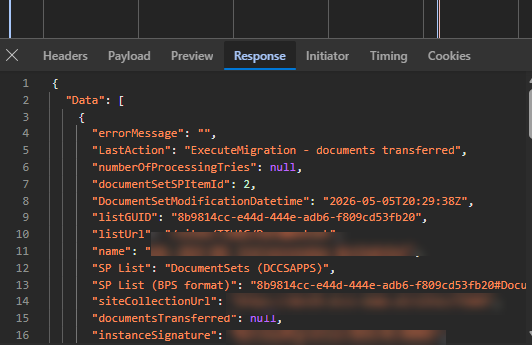
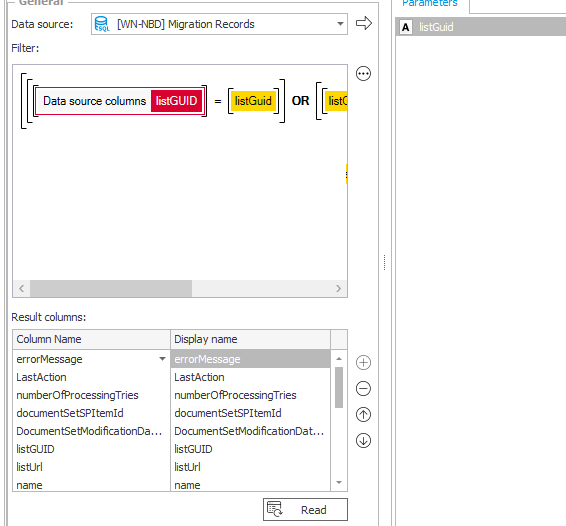
The Get data from data source running mode is like a data table, which can be accessed via a GET request.
- You select a data source
- Define public names for the columns
- Add optional filters via parameters, which you also know from automations
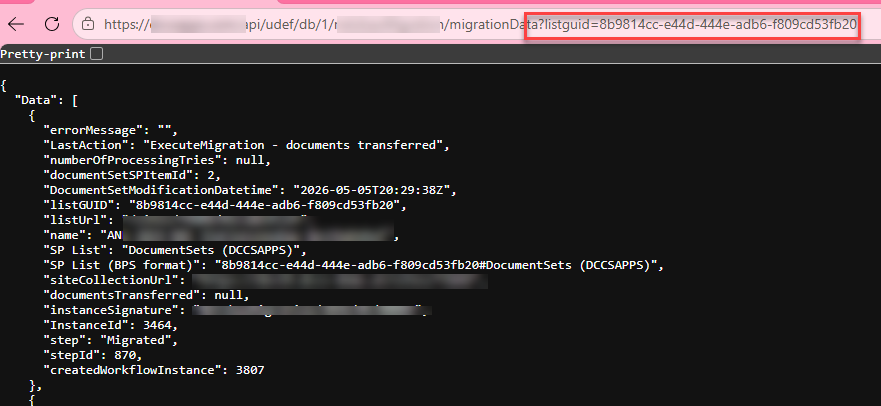
Afterwards you can access the data via a simple GET. If cookie authentication` is enabled you can even test it from the browser.
If you want to have more detailed explanation you can take a look at the official documentation.
Benefits
Automatic conversion to JSON
In the past I’ve used a lot of business rules to return data from WEBCON inside HTML fields. For example for the breadcrumb and automated path coloring. The issue here was that I needed to use SQL to convert the values to JSON and store the result in a HTML fields. This led to issues if special characters had been used. This is something which will be handled by WEBCON automatically.
Reuse existing data sources
You can simply reuse any existing data sources, which makes it easy to have a single source of truth.
Privileges
According to the documentation the privileges of the executing user will be applied, if you use BPS internal views.
Inconveniences, pitfalls and workarounds
Common to all running modes
There are pitfalls which are common to all running modes which I’ve described in part 1:
- Moving API definitions
- Time and time zones are a never-ending issue in IT
- Logging UDA vs public API
- Errors
BPS internal views ignore seconds
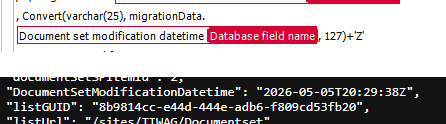
In most cases you won’t need to know the seconds, but if you do need to know them, you cannot use BPS internal views. Even if you have a date field and not a date column of an item list the BPS internal view will just omit the seconds.
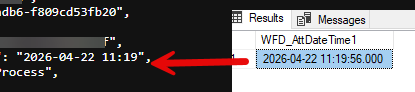
If you need the seconds, you will have to switch to a SQL data source and format the value correctly
, Convert(varchar(25), migrationData.{WFCONCOL:4180}, 127)+'Z'
Time zone issue
I’ve worked around the issue that the current version completely ignores the time zones, by adding the ‘Z’ to the value. This will tell the client that the value is in UTC+0 time zone.
, Convert(varchar(25), migrationData.{WFCONCOL:4180}, 127)+'Z'
Remark: You may need to verify this for your environment as this may have different time zone settings.
While this works fine for date fields this is something else for item list date time columns. They are stored in a text field, and this can be a little bit more complicated / should be checked for each case, if the values are passed from an external system.
Optional filters
If you sometimes want to pass a filter and sometimes you want to retrieve all information, you can use this approach:

1000 record limit
Limitation
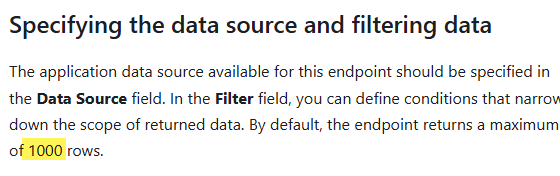
I’ve no idea how the people writing the documentation think. I would have highlighted the fixed limit of 1000 rows. At least I haven’t found an option to change this limit even if the wording suggested, that it can be changed.
It would be nice if the UDA would support a paging option by default. This would save us configuration effort as we need to configure it for each UDA.
Simple paging for 99% of cases
My first approach was simple:
- At an order by to the SQL data source
- Add a parameter
lastReturnedInstanceId - Add an optional filter using this filter
This allowed us to get the first 1000 records, get the instance id of the last record, execute a new call and pass the last instance id. The next call would get the next page and so on.
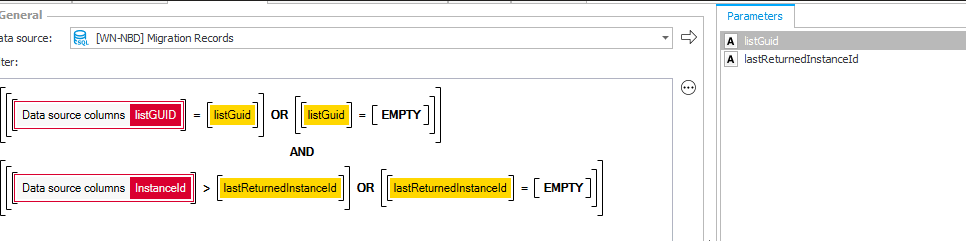
lastReturnedInstanceId is empty the first 1000 records will be returned, otherwise those after the passed instance id
Complex paging for 100%
Issue
This was working fine for 99% of the cases. For one specific case it just silently failed with a 502 error. There wasn’t any other information:
- UDA Logs table was empty
- Event log
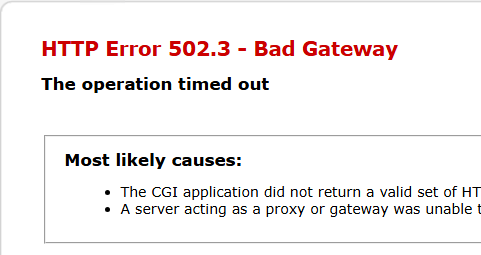
In the end, I identified that a specific record caused this, if it was part of the result. Everything was fine, if I only returned this record or a limited number of elements. I have no idea why this record caused the issue. All records had similar information and if the record would have invalid characters in a value, then it shouldn’t be possible to retrieve it at all. I used a different filter where I switched from the greater than to equal operator to verify it.
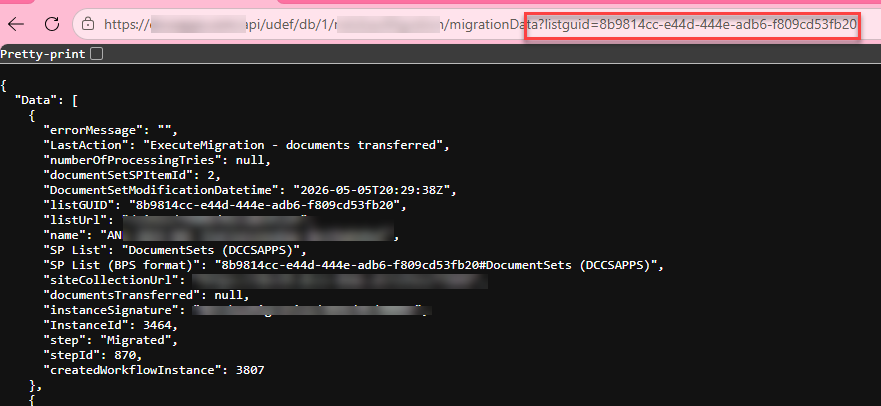
Resolution
The first step to identifying the problematic record was to change the filtering. Instead of getting all records after the passed instance id, I changed the filter to pass an upper /lower range.
?listGuid=a09ceaeb-7fa8-4cb7-a178-c92e76c2b02e&instanceIdLowerRange=26972&&instanceIdUpperRange=27504
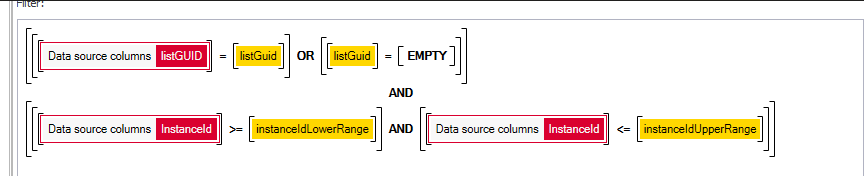
This allowed me to define the page/batch size returned by WEBCON and to narrow down on the culprit:
- Get instances between 26972 and 27504 (failed)
- Get instances between 27250 and 27504 (worked)
- Get instances between 27225 and 27504 (worked)
- Get instances between 27200 and 27504 (failed)
- etc
I verified that, if the batch was small enough, I could retrieve the data with the problematic record.
The next challenge was that I no longer could use the “start with last retrieved instance id”. After all, this will fail. I needed to know in advance which records there are in total.
The workaround was to create another UDA. This should return all instance ids. In addition, I needed to filter this by ListGuid, so I had to add the filtering to the UDA
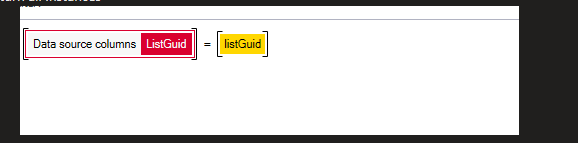
The underlying SQL data source returns a comma separated string of all instance ids grouped by ListGuid.
string_agg(cast(migrationData.WFD_Id as nvarchar(max)),',') as InstanceId
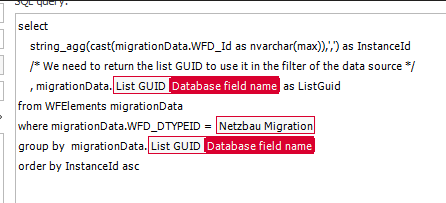
I’ve opted for the comma separated string due to these reasons:
- I didn’t want to add a paging mechanism again.
- Getting all instance ids in one request allows to create the batches on my own.
- A comma separated string is smaller than a JSON array.
- I didn’t want to use a fixed batch sizes.
Let me elaborate on the last one. I could have taken the approach that I always return 200 instances and this may have worked out, but as a technician I didn’t like this.
- In most cases the 1000 records had been returned fine. Why should I multiply the GET requests in all cases?
- Who ensures that there won’t be another case in which it fails with the defined batch size.
Therefore, I started each request with 1000 instances. If this failed with a 502.3 error, the batch would be split by half, and it starts again. In the worst case, this will repeat until a single instance is returned, which is unlikely. :)
Only data sources and no connections
Bloating the global data sources
In the UDA you have to select a data source and cannot use a connection like in a data table.
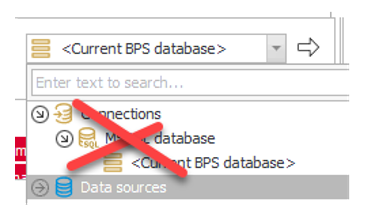
So we need to create a global data source, even if it’s used only for one use case. That’s something I don’t like.
Filtering
Assumption
The issue here is that the SQL data source is used as an inner select and the filter is added to the outer one (1).
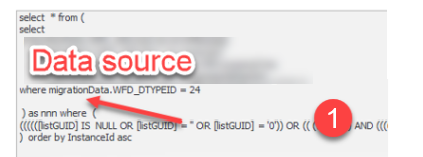
This may be fine for simple SQL statements but for complex ones this causes an unnecessary load for the SQL server. At least this is my assumption.
AI explanation
I’m copying here the final answer from AI which I got after discussing my assumption:
SQL Server Predicate Pushdown
What is Predicate Pushdown?
When you submit a query to SQL Server, the query optimizer doesn’t always execute it exactly as written. One of its most important optimisations is predicate pushdown — moving a WHERE filter closer to the base table (the data source), rather than evaluating it after a larger intermediate result has been produced.
Consider this example:
SELECT *
FROM (
    SELECT Col1, Col2 FROM MyTable
) AS D
WHERE Col2 = 'ABC';
Logically, the subquery runs first and produces a full result set, which the outer WHERE then filters. In practice, SQL Server rewrites this internally to:
SELECT Col1, Col2 FROM MyTable WHERE Col2 = 'ABC';
The filter is pushed down into the inner query, so fewer rows are scanned from the start. This is especially beneficial when the filtered column has an index — pushdown turns a full scan into an efficient index seek.
When Pushdown Fails
There are several cases where SQL Server cannot push a predicate into an inner query. These are called unnesting inhibitors.
####### 1. TOP or OFFSET-FETCH in the inner query
SQL Server cannot safely push a filter past TOP or OFFSET-FETCH because doing so would change which rows are returned — producing incorrect results.
-- The outer WHERE is STUCK — it cannot be pushed past TOP
SELECT *
FROM (
    SELECT TOP (100) Col1, Col2 FROM MyTable ORDER BY Col1
) AS D
WHERE Col2 = 'ABC';
SQL Server must first materialise the top 100 rows, then apply the filter.
####### 2. Non-SARGable Predicates
A predicate is SARGable (Search ARGument Able) when SQL Server can use an index to satisfy it. Wrapping a column in a function makes it non-SARGable — the optimizer cannot seek on a transformed value.
-- Non-SARGable: full scan required, filter applied row-by-row
SELECT * FROM MyTable WHERE YEAR(OrderDate) = 2023;

-- SARGable equivalent: index seek possible
SELECT * FROM MyTable WHERE OrderDate >= '2023-01-01' AND OrderDate < '2024-01-01';
####### 3. Scalar UDFs on the Filtered Column
A scalar user-defined function (UDF) blocks pushdown when the outer filter references its output, because the value doesn’t exist in the base table — it must be computed per row first.
-- Pushdown BLOCKED: ComputedVal is derived, not a base column
SELECT *
FROM (
    SELECT dbo.MyScalarFn(Col1) AS ComputedVal FROM MyTable
) AS D
WHERE ComputedVal = 'ABC';
Additionally, scalar UDFs execute once per row, prevent parallelism, and are opaque to the optimizer. SQL Server 2019 introduced Scalar UDF Inlining (compatibility level 150), which can automatically inline simple UDFs and recover these optimisations. Check eligibility with:
SELECT name, is_inlineable FROM sys.sql_modules WHERE object_id = OBJECT_ID('dbo.MyScalarFn');
####### 4. Local Variables in the WHERE Clause
By default, SQL Server does not push down filters that reference local variables.
DECLARE @val NVARCHAR(50) = 'ABC';

-- Pushdown may NOT occur by default
SELECT * FROM (SELECT Col1 FROM MyTable) AS D WHERE Col1 = @val;
To enable this, turn on query optimizer hotfixes at the database level:
ALTER DATABASE SCOPED CONFIGURATION SET QUERY_OPTIMIZER_HOTFIXES = ON;
####### 5. Aggregates on Non-Grouped Columns
When a derived table uses GROUP BY, an outer filter on a computed aggregate (like SUM or COUNT) cannot be pushed down — the aggregate must be fully evaluated first.
-- 'Total' is computed — pushdown blocked, full aggregation runs first
SELECT *
FROM (
    SELECT Category, SUM(Amount) AS Total FROM Sales GROUP BY Category
) AS D
WHERE Total > 1000;
Filters on grouping key columns (Category in this example) can still be pushed down.
####### 6. Multiple Nested Derived Tables
Pushdown can work across multiple layers, but any single inhibitor in any layer blocks pushdown for everything above it. The deeper the nesting, the greater the risk.
-- Pushdown stops at the TOP layer — the outer WHERE cannot reach the base table
SELECT *
FROM (
    SELECT *
    FROM (
        SELECT TOP (100) Col1, Col2 FROM MyTable ORDER BY Col1
    ) AS Inner
) AS Outer
WHERE Col2 = 'ABC';
Best Practices
- Filter early: Don’t rely on the optimizer — place
WHEREclauses as close to the base table as possible, especially inside deeply nested queries. - Keep predicates SARGable: Avoid functions on columns in
WHEREclauses; rewrite range conditions instead. - Avoid scalar UDFs in hot paths: Use inline table-valued functions or rewrite logic directly in the query where possible.
- Check the execution plan: Use
SET STATISTICS IO ONor view the actual execution plan. AFilteroperator sitting above a scan (rather than a seek predicate) is a clear sign pushdown has not occurred.
Comments