
Removing binary content of deleted attachments
Overview
When a user removes an attachment in the BPS Portal, or when an automation removes it without explicitly clearing the file content, the binary data stays in the database. The attachment is flagged as deleted but the bytes are never freed.
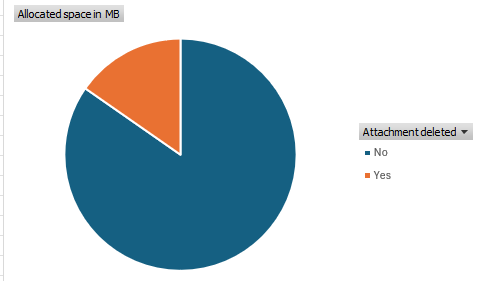
Whether this is an issue depends on your use case. If it’s a generated document, you likely don’t need those. On the other hand, it may be even an issue, that users can access a deleted version. While you can correct this for the future, you still need to handle the old documents.
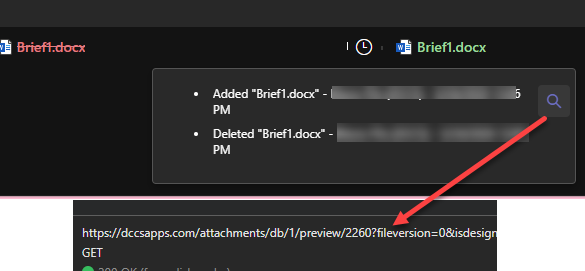
WEBCON BPS has no built-in mechanism to clean this up.
Delete attachments with binary data
Konrad Keppert (WEBCON)
Unfortunately, there isn’t a simple way. Once an attachment is removed, it is flagged as deleted in the database and further actions do not operate on it. The functionality to remove binary data of deleted attachments is in backlog and I hope it will be implemented sooner than later. As a workaround, advanced users may want to manually update ATF_Value to empty string or change ATT_IsDeleted to 0 and then execute an action again.
If something is not possible with the built-in options, it’s a good topic for a blog post. :)
Removing the content of deleted attachments
The suggested way requires modifying the database directly. We can simply clear the content directly instead of marking the file as not deleted and then trigger the action to remove the content.
I prepared two versions for this:
- Single script
This is intended for a quick execution / limited amount of data you want to remove in a test database. This runs in a single transaction. - Database backend
I’ve used this to cleanup a large amount of data in a production environment. Production environments are always special, and I wanted to have a better option to verify what would happen and what did happen. In addition, this will execute the cleanup in transaction batches, which will prevent the transaction log file grows too much.
Both approaches clear the file content by setting ATF_Value to an empty binary value (0x0) and marking both the attachment and its versions as deleted. Neither approach deletes rows from the database, so no referential integrity is affected.
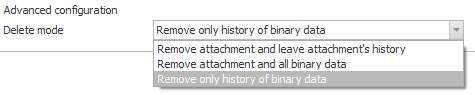
Remark: If the attachment isn’t deleted I recommend to use the action Remove attachment and set the mode to Remove only history of binary data.
Remark: These scripts modify data directly in the WEBCON BPS database. Always run in dry-run mode first, take a backup before executing, and test in a non-production environment.
Option 1: Single script
This script is suited for targeted cleanups on a smaller number of records. It uses a table variable to collect the records matching your filter, shows a preview in dry-run mode or executes the update inside a single transaction.
The key configuration is at the top of the script:
declare @dryrun bit = 1; -- Set to 1 for dry run (preview), 0 for actual update
The WHERE clause controls which attachments are selected. Adjust it to match your scenario:
where /* ATT_Name like 'GeneratedDocument%' */
    ATT_WFDID = 993
    and ATT_IsDeleted = 1
    and datalength(ATF_Value) > 1;
Tip: Take a look at Filters for a few suggestions.
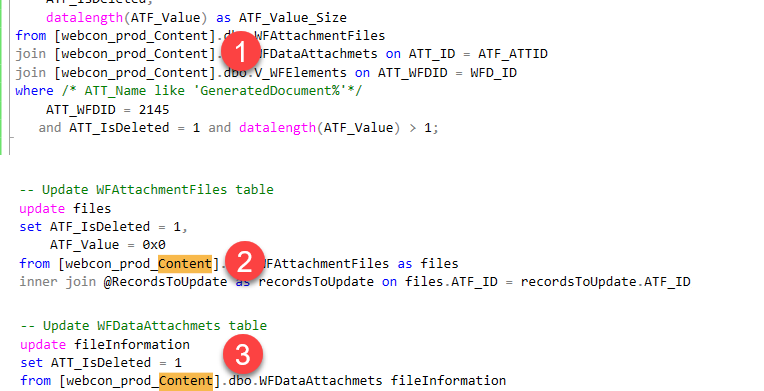
Make sure that you update all references to the correct databases. There are three places in the script in which you need to define the content database and the attachment file database. The latter one can be different for each process. You can simply search for Content in the script.
Tip: If you have already opened up the SQL Management Studio, you can use this statement to get the attachment database name of the processes.
select DEF_Name, DEF_AttachmentsDatabase
from WFDefinitions
In dry-run mode the script prints the estimated data volume and lists every record that would be affected. When you set @dryrun = 0 the update runs in a single transaction and rolls back automatically if the affected row count does not match the expected count.
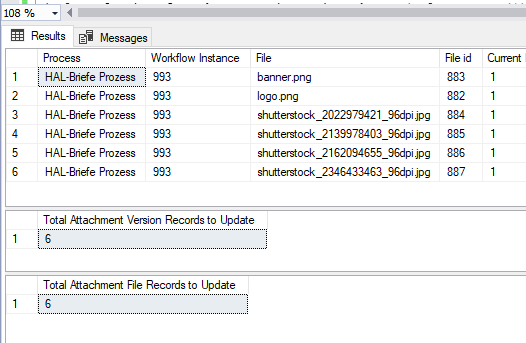
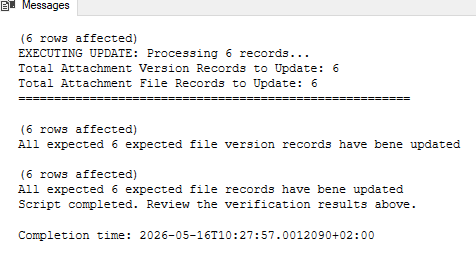
Remark: Because the update runs in a single transaction, the SQL Server transaction log will grow by at least the total size of the binary data being cleared. Verify that you have sufficient free space in the transaction log and data files before running the actual update on a large dataset. If in doubt, use Option 2.
Option 2: Database backend approach
This approach is designed for larger or long-running cleanups where you want better visibility and control. It uses a dedicated database AttachmentCleanupDB as a job log and processes records in configurable batches, committing each batch separately to keep the transaction log manageable.
The four scripts are intended to be run in order.
Script 1: Setup
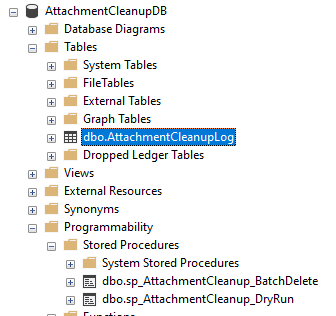
Run AttachmentCleanupDB_1_setup.sql once. It creates the AttachmentCleanupDB database, the AttachmentCleanupLog table, and two stored procedures:
-
sp_AttachmentCleanup_DryRun
Reads the log table and shows all pending records along with their current state in the live database. -
sp_AttachmentCleanup_BatchDelete
Processes pending records in batches. Each batch is committed independently. Records that fail are marked with statusErrorand the error message is stored in the log table for review.
Script 2: Populate log table
AttachmentCleanupDB_2_populate.sql queries the WEBCON BPS databases and inserts the matching attachment records into AttachmentCleanupLog with status Pending.
Before running the script, you need to:
- Update the database names
WEBCON BPS can store attachment data in a dedicated database that is separate from the content database. These are defined by each process. - Update the filter
This should match your scenario. I’ve listed a few suggestions here.
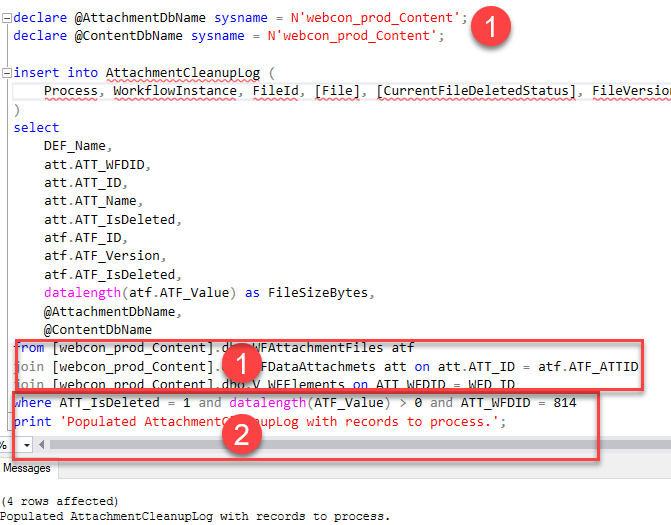
Remark: You need to provide the database names in the SELECT because the other stored procedures will generate a statement using these. Otherwise, we would need to modify the script each time to match the target databases.
Tip: If you already opened up the SQL Management Studio, you can use this statement to get the attachment database name of the procresses.
select DEF_Name, DEF_AttachmentsDatabase
from WFDefinitions
You can run this script multiple times with different filters to add more records to the log before starting the deletion.
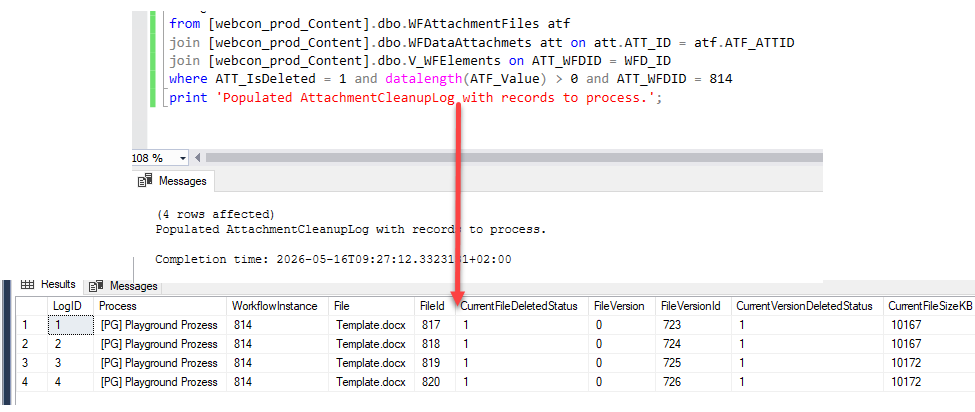
AttachmentCleanupLog table to verify the results.
Script 3: Dry-run
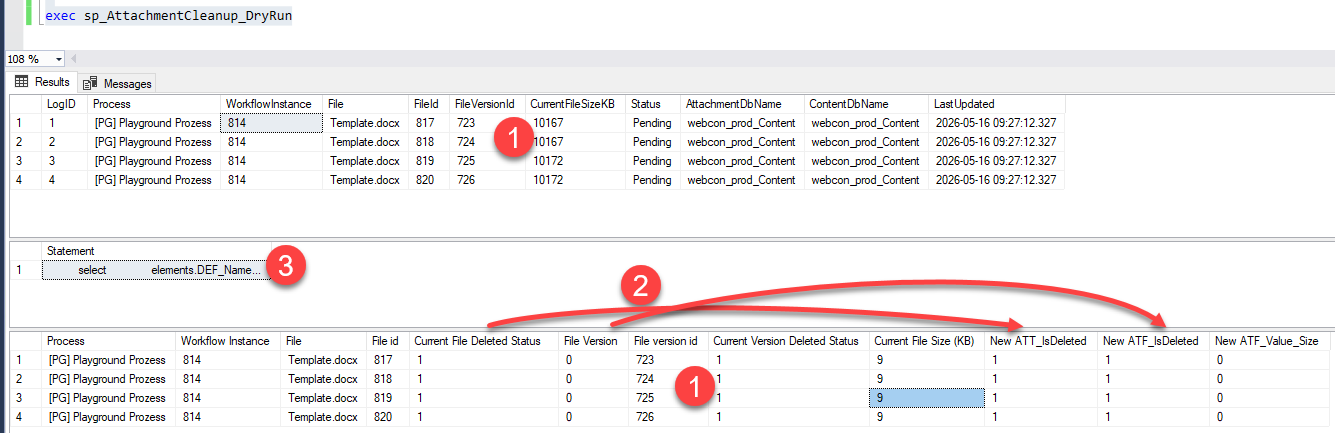
AttachmentCleanupDB_3_dryrun_proc.sql calls sp_AttachmentCleanup_DryRun. Review the output to confirm the record list. This is the last step, to ensure that everything is fine.
- You can compare the records using the file version
- Verify the current/new status / file size.
- You can view the generated statement.
Script 4: Batch delete
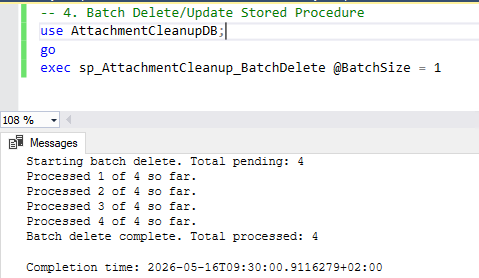
AttachmentCleanupDB_4_batchdelete_proc.sql calls sp_AttachmentCleanup_BatchDelete with a configurable batch size (default 1000). Each batch commits independently, so the transaction log stays under control even for very large datasets.
exec sp_AttachmentCleanup_BatchDelete @BatchSize = 1000
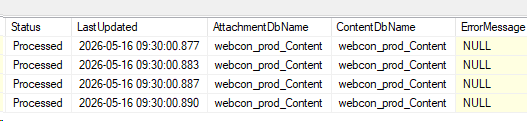
After completion, you can check the log table. In theory individual errors for a record should be saved, but I haven’t tested it.
Filters
Filtering the attachment files
Recommendations for the filter
- ATT_WFDID
Restrict to a specific workflow instance for testing - ATT_Name
If you generate documents, you can filter using the same pattern used for generating. Make sure that no custom documents are accidentally included. - ATT_Description In some processes, I’ve hidden the description in the UI, so that the users couldn’t provide a description and I set a value for all generated values.
- ATT_Attribute1
This stores the value of the
Category(folder)if enabled. - ATT_IsDeleted = 1 Should always be included to avoid removing versions of still existing files, at least if you don’t want to achieve just that. :)
- ATF_TsUpdated In case you want to remove only versions which are older than two years.
Get all attachments of form types
This script will return all attachments in a given process.
declare @defId int = (select DEF_ID from WFDefinitions  where DEF_Guid = 'de6a610b-ca59-4058-9907-53f6b3887431')

select WFAttachmentFiles.ATF_ATTID, WFAttachmentFiles.ATF_Version, WFAttachmentFiles.ATF_OrginalName
from
  WFAttachmentFiles
  join WFDataAttachmets on ATF_ATTID = ATT_ID
  /* The V_WFElements view would be another option, but the execution will be longer because of the numerous joins */
  join WFElements on ATT_WFDID = WFD_ID
  join WFDocTypes on  WFD_DTYPEID = DTYPE_ID
where
 DTYPE_DEFID = @defId
You can combine the filters on the attachment files table with the form type like this
....
where
   ATT_IsDeleted = 1 and datalength(ATF_Value) > 1
   and ATT_ID in (
    select WFAttachmentFiles.ATF_ATTID
    from
      WFAttachmentFiles
      join WFDataAttachmets on ATF_ATTID = ATT_ID
      /* The V_WFElements view would be another option, but the execution will be longer because of the numerous joins */
      join WFElements on ATT_WFDID = WFD_ID
      join WFDocTypes on  WFD_DTYPEID = DTYPE_ID
    where
    DTYPE_DEFID = @defId
   )
Disk space of deleted attachments
This SQL statement will list how much space is taken by the attachment versions. While this can be an indicator of whether you can free up some space. Make sure that the business is fine for deleting those versions.
select
 ( select sum(datalength(ATF_Value)/1024/1024) [Total MB]
  from dbo.WFAttachmentFiles join WFDataAttachmets on  ATF_ATTID = ATT_ID
  where ATF_IsDeleted = 1 and ATT_IsDeleted = 0) [Total MB of deleted attachments versions, which files have not been deleted] ,
  ( select sum(datalength(ATF_Value)/1024/1024) [Total MB]
  from dbo.WFAttachmentFiles join WFDataAttachmets on  ATF_ATTID = ATT_ID
  where ATF_IsDeleted = 1 and ATT_IsDeleted = 1) [Total MB of deleted attachments versions, which files have been deleted] ,
  ( select sum(datalength(ATF_Value)/1024/1024) [Total MB]
  from dbo.WFAttachmentFiles join WFDataAttachmets on  ATF_ATTID = ATT_ID
  where ATF_IsDeleted = 0) [Total MB existing attachments versions]

Download
You can find the files here.
Comments