
WEBCON 2027 R1 Change log excerpt and thoughts
Remark
When I read through the change log I have copied over a few excerpts, these are displayed as quotes in this post. Anything not in quotes are my personal thoughts. The selection criteria for these excerpts from the change log are:
- Will the changes have a direct impact on my work
- Do I have any thoughts about the change
- Is there a ‘hidden’ gem or important information, these are marked with a
*in the title
Compared to my previous Change log posts, this one is quite small in comparison. That’s probably due to the fact that WEBCON started to release new features whenever they are ready with a new version and not only with the next major or Rx version. In addition this was the first major change log which didn’t list the new features since the last Rx version.
Upgrade impact
Preparation
This seems to be important:
Fixed an issue with saving Color themes when using images uploaded from disk. Validation of image-related fields has also been improved so that invalid configuration is clearly indicated before saving. NOTE: Before updating to the new version, make sure that all required Color theme configuration fields are completed correctly, including when using images uploaded from disk.
Migration of keys from int to bigint
Changing keys requires resources, not only time but diskspace. If you haven’t just started with WEBCON you should take a look at the number of created instances.
The tool is recommended when at least one of the following applies: • the WEBCON 2027.1 installer shows a long migration warning – the WFElements, WFElementDetails, WFHistoryElements, WFHistoryElementDetails, WFActionExecutions, and WFAttachmentFiles tables contain a total of at least 40 million rows (the installer estimates approx. 30 min per 10 million rows), • the installer’s estimated migration time is longer than the available maintenance window.
Taking a look at the table, I clearly understand why this tool was created.
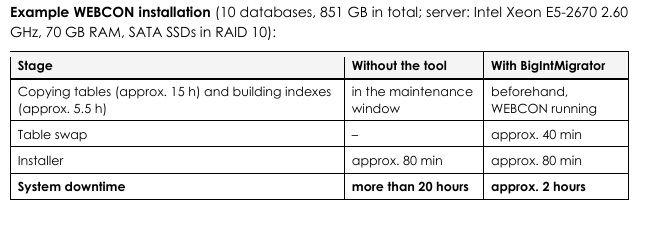
BigIntMigrator console tool – migrating INT keys to BIGINT
PowerShell 7 support
PowerShell scripts will now run in v7 instead of 5.1.
Name changes
- Desktop Designer Studio is now called the WEBCON Legacy Designer Studio
- The term
Designer Studiois now used for the web based Designer Studio - BPS was removed from the product and a lot of UI elements. Removing it from the backend completely would probably take way more time and provides zero benefits. The WFDataAttachmets will probably never be renamed. ;)
- Updated the terminology in the Vacation schedule, replacing Employee with Person. The change has been applied to all language versions
Designer Studio
Overview
It will take a few more months before I will be able to make use of the studio. I’m not aware of any project I worked on, where I haven’t used at least two form types for one workflow. According to the roadmap this will be implemented between March 2027 and the end of June 2027.
You can take a look at this post to see when specific features will be added. Designer Studio: Development Plan After the WEBCON 2027 Release
There’s some kind of tutorial, but there’s no link in the change log.
The Designer Studio Academy module has been added to Designer Studio, providing interactive training on the basics of using the tool and building business applications.
If you haven’t noticed them, WEBCON published a few Sneak Peeks on the community site.
- [WEBCON 2027 Sneak Peek] Designer Studio Goes Web
- [WEBCON 2027 Sneak Peek] Build Without Boundaries
- [WEBCON 2027 Sneak Peek] Designer Studio Migration: What to Know
- [WEBCON 2027 Sneak Peek] The New Designer Studio, Built Around How You Work: A First Look at the New Interface
- [WEBCON 2027 Sneak Peek] Drag. Drop. See It: Form Design Without the Guesswork
- [WEBCON 2027 Sneak Peek] More Room to Build: Multiple Windows, Full-View Focus
- [WEBCON 2027 Sneak Peek] From Browser to AI: Extending Your Apps with MCP
- [WEBCON 2027 Sneak Peek] One Workflow, Two Designers: Collaboration Without the Guesswork
- [WEBCON 2027 Sneak Peek] From First Edit to Publish: Every Change Under Control
* Removed / retired features, ouch
Most important are the features which won’t be moved to the web and therefore will be gone in the 2028 release. I’ve marked those, which will probably be a pain.
| Feature | What happens next | Alternative |
|---|---|---|
| SharePoint data sources | Retired | No replacement. |
| SharePoint connections and SharePoint list | Retired | No replacement. |
| SOAP data source and connection | Retired | No replacement. |
| Change assigned archive database and attachment database of a process | Retired | No replacement. |
| Changing the type of an existing form field or column | Retired | No replacement. |
| Task form on a step | Retired | Separate workflow steps or visibility rules. Before support for Legacy Designer Studio ends, we will publish instructions on how to reconfigure a workflow yourself. |
| Dictionary processes and document template processes as separate process types | Replaced | We will move dictionaries and templates to standard processes or to a new data model. We will describe the migration method, including data transfer, separately. |
| Form field: Report | Replaced | A new, more capable form field that will not be migrated automatically and will need to be configured from scratch. |
| Checking out and locking processes for editing | Replaced | Developer edit sessions in the new Designer Studio. |
| Loading global automations from a file | Replaced | Global automations will be rebuilt and will gain new features. |
| Context help under the F1 key | Replaced | Documentation available online and, in the future, an AI assistant for WEBCON developers. |
| Configuration of services and their reports | Moved outside Designer Studio | A separate administration application. |
| License management and activation | Moved outside Designer Studio | License activation in the installer and license updates in the administration section of Portal. |
| Configuration of the application presentation layer: menu, start buttons, dashboards, reports | Moved outside Designer Studio | These areas will be configured exclusively in Portal. |
Btw. these are not part of the Platform Compatibility Roadmap (yet).
MCP server
This was already announced during the WEBCON DAY, one side effect of the new Designer Studio will be that it is the base for creating/modifying processes with AI.
The Designer Studio MCP server currently provides several dozen tools covering process configuration. Instead of a static list, the server generates its own documentation, which always reflects the current set of tools.
A ready-made setup skill that guides you through the configuration will be available on the WEBCON GitHub: https://github.com/WEBCON-BPS
At the time of this writing the skill repository didn’t exist and my side-project with Claude wasn’t really working out in a way I imagined it.
But, the active user still needs a license. ;)
The legacy Designer Studio can also be used to export/import applications that have been migrated to the web Designer Studio.
Improvements
Search
Goodbye full-text search. I’m not sure that I like it as the SOLR search had some problems with ‘interesting’ search strings too.
The search mechanism in the report search panel has been changed. The previously used SQL Full-Text Search mechanism has been replaced with SOLR based search. During the system upgrade, all full-text indexes are removed from the content, attachment, and archive databases. UWAGA: As a result of this change, searching content in the archive is no longer available.
I assume UWAGA means something like remark/attention. ;)
Markdown files are added to the SOLR. :)
AI
- More information about token usage
- AI Concierge user interface improved
- Access to AI Concierge can be restricted
- AI assistant in Designer Desk was improved including better BPMN support.
- AI-related elements now have their own node in the
Global Parametersof the Legacy Designer Studio. - Self-hosted AI Proxy improvements
Information & UX
- More details why a workflow was modified
The message informing that a workflow instance was modified on another workstation has been extended to include the identifier of the affected instance. Fixed an issue that could occur when operations were performed concurrently on the same workflow instance, e.g. when a Timer was processing an instance while a user opened its form at the same time. In such cases, the technical message “The database operation was expected to affect 1 row(s)…” could be displayed during a path transition or recorded in the instance History. … If the conflict occurs again, users are shown a message informing them that the instance is being checked out for editing as part of another operation and that they should try again later.
- Tooltip improvement
Improved the accessibility of information buttons (tooltips) marked with an “i” icon in Portal. Standardized the way contextual help is displayed and information dialogs and panels are opened. Enhanced keyboard and screen reader support, including focus management and navigation within help popovers. Extended the information displayed in the tooltip of the icon marking form fields filled in by AI Concierge. The tooltip now displays the assistant’s name and the reasoning behind the selected value
- Mobile authentication not available
Added a message to the authorization method selection screen explaining why authorization via the mobile app is unavailable.
- I doubt, that it will help the user, but it will help the support team. :)
Improved the clarity of the message displayed when a user does not have permission to start new workflow instances
- Mobile app
Improved the display of the report view list in the mobile app. The list now uses the available screen space, making it easier to switch between views.
File previews
- Yeah, preview of Markdown files. Except the embedded html, this is rendered as plain text. Why? At least give us an option, as is the case with the Excel preview.
- Preview of .css as plain text. While I wouldn’t count myself as the standard user, I’ve never come across this need. :)
Telemetry / Monitoring
- Support for SEntry
- Additional Open telemetry information
Mobile
Fixed an issue resulting in a login loop in the WEBCON mobile application when attempting to access Portal through Azure App Proxy with Microsoft Entra ID pre-authentication enabled
SDK
Less refactoring of SDK code
Ok, there will be less need to refactor the source code, but there’s no word whether the SDK has to be rebuilt for the current WEBCON version. I think this rebuild check was introduced with 2024 and I’m wondering if this check will still be applied in 2028 or whether the plugins will just work again like it was until 2024.
Existing SDK methods will no longer be modified, and new functionality will be introduced by adding new methods or overloads. The distribution of Visual Studio project templates and the NuGet package has also been changed. Instead of creating separate templates and packages for each major WEBCON version, they will be continuously updated.
But before we will be able to make use of it, we need to got through the SDK migration file once again https://community.webcon.com/community/public/uploads/editor/SDK_Migration_2027_1.pdf
Declaring plugin permissions (consents)
That’s something I have to play around with, to really understand it.
The package manifest can now declare what a plugin needs access to, e.g. reading workflow instances, sending data outside the system, or executing SQL queries on the WEBCON database. Permissions are listed in the consents node of each plugin in the extensions list. Permissions with the sensitive or privileged protection level also require a justification for the administrator (reason) – without it, the package will be rejected during upload. In version 2027.1, the declaration is not mandatory – a package without the consents node is uploaded as before, and permissions are not checked while the plugin is running. However, it is recommended to complete them already during migration, since declaring permissions will become mandatory in future versions. Permissions can be completed automatically based on the plugin code – using the “Consents” button in the WEBCON SDK Tools window.
* Clearing historical values
That’s nice. :)
Extended the plugin module with the ability to clear historical data of a specified workflow instance. The new methods allow historical values of selected form fields, including the Comments field, and Item list columns to be removed or replaced. For text fields, a replacement value, including null, can be specified, while values of other field types can only be cleared. The extension also enables attachments to be removed together with their history or only the historical file content to be cleared.
Access permissions for custom files
The CustomFilesManager allows you to move/create a file which can be accessed via a link and this attachment is not part of a workflow instance. I’ve used it a few times in the past. The drawback was, that the link worked for anyone. Those times are gone, if you want it.
Reusing REST Connections
There’s now an option to use a configured REST connection in an SDK. :)
Comments