
Align custom page footer with page number
Overview
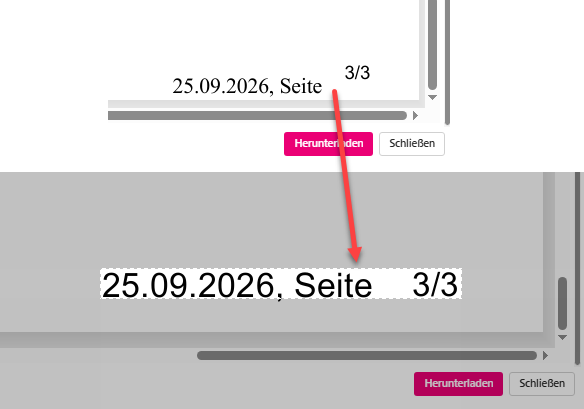
I’ve run into the request that a generated pdf should include a footer with page number. While WEBCON can automatically add page numbers, I didn’t find an option to include the page number in a custom footer. It required some testing to generate a footer which at least looks like it is intended to be this way. I hope that I don’t need to modify it in future versions. :)
Implementation
General
There are various options to implement the HTML definition in my case I used a global automation, created a local parameter and set its values.

While running the trial and error process I noticed, that I need to use different stylings for landscape and portrait mode. Key stylings are:
- Landscape
font-size:14px; font-weight:normal; font-family: Arial, Helvetica, sans-serif;margin-top:-8pxandmargin-right:35px - Portrait
font-size:18px; font-weight:normal; font-family: Arial, Helvetica, sans-serif;margin-top:-8pxandmargin-right:55px
If you have more than 10 pages it may be necessary to adjust the margin-right values for both page orientations.
Landscape HTML footer definition
The following HTML allows you to define text on the right and left side of the page. It will use the workflow instance signature on the left and the current date in the language of the current user.
<div style="display: flex; justify-content: space-between; width: 100%;font-size:14px; font-weight:normal; font-family: Arial, Helvetica, sans-serif;margin-top:-8px "><div>{WFD_Signature}</div><div style="margin-right:35px">{LDATECURRENT}, Page</div></div>

Portrait HTML footer definition
The following HTML allows you to define text on the right and left side of the page. It will use the workflow instance signature on the left and the current date in the language of the current user.
<div style="display: flex; justify-content: space-between; width: 100%; font-size:18px; font-weight:normal; font-family: Arial, Helvetica, sans-serif;margin-top:-8px"><div>{WFD_Signature}</div><div style="margin-right:55px">{LDATECURRENT}, Page</div></div>

Recommendations
Maintenance
I recommend that you do one of the following to improve the maintainability:
- Use a global business rule, with parameters if necessary This will provide you with a single source of truth for any future modifications. The parameters could allow you to define the content for the left and right side of the page.
- Use global constants
If a global business rule is no option, you could still create a constant for the styling and reference it in the footer. This way you can also make use of the
Usagestab to locate every action. Especially in the upcoming WEBCON 2027 web-based Designer Studio.
Multilingual
If you are running this in a multilingual environment you may want to translate the ‘Page’ label, you can make use of the Text business rule.
Comments