
Upgrade WEBCON BPS 2023 R2 to 2026
Overview
This post is an overview of all the topics we needed to take care of, when we upgrade an environment from 2023 R2 straight to 2026. Besides the points listed here, I’ve also checked these notes:
- Upgrade WEBCON BPS 2022 to 2025.
- WEBCON BPS 2024 Change log excerpt and thoughts
- WEBCON BPS 2025 Change log excerpt and thoughts
- WEBCON BPS 2025 R2 Change log excerpt and thoughts
- WEBCON BPS 2026 R1 Change log excerpt and thoughts
New licenses starting with version 2026.1.4
At the time of this writing the version 2026.1.4 hasn’t been released yet, but it’s still a must read for everyone. https://community.webcon.com/posts/post/licenses-2026/598/3
UI
Updating reports and dashboards
In addition to the feature which 2025 offered we can now freely place the widgets on the dashboard in 2026. While you don’t need to, I still recommend taking use of the new options:
- You can add folders in the navigation
- Add start buttons, dashboards and reports to the folders
- Add icons to the folders
- Define user privileges on the folder level
- Add filtering options on the dashboard, which will be applied to all elements.
- Place widgets freely on the dashboard (new in 2026).
For more details on these and other new features you can take a look at t change log 2025 and White paper 2026.
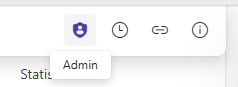
New Admin mode icon
I really like this one:
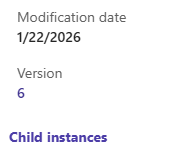
Renamed labels Parent workflow and Subworkflow instances
At least the English translations of the parent and subworkflow instances elements in the info panel have been renamed.
CSS
In version 20261.1.2.91 I added a few CSS fixes. The CSS has been added to the themes, so that I don’t need to copy the themes and the global CSS when upgrading the production environment.
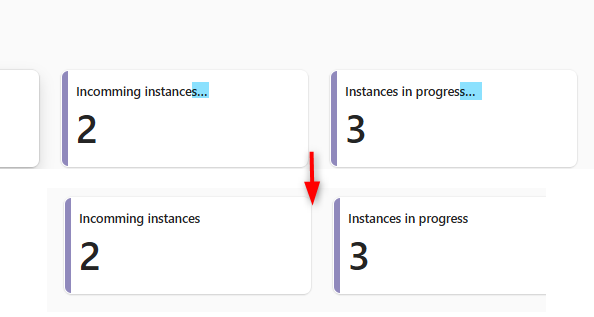
Ellipses / trailing dots
The used version rendered trailing dots, also they weren’t necessary.
/* remove ellipses at the end of an element */

.dashboard-tile__name .webcon-ui-tooltip-ellipsis--multiple  { -webkit-line-clamp:2 !important}
.start-tile__wrapper  .webcon-ui-tooltip-ellipsis--multiple  { -webkit-line-clamp:3 !important}
.dashboard-navigation-item__content-wrapper .webcon-ui-tooltip-ellipsis--multiple  { -webkit-line-clamp:2 !important}
.dashboard-navigation-item__action-wrapper .webcon-ui-tooltip-ellipsis--multiple  { -webkit-line-clamp:2 !important}
.primary-button class not applied in HTML fields
We had a HTML field which should be rendered similar to the standard (primary) button, but this wasn’t the case.
/* Copied css definition of a button-primary. The standard class has a lower precendece and doesn't apply to elemtns in an html-control */
.html-control button.button--primary {
    background-color: var(--colorBrandBackground1);
    border: var(--strokeWidthThin) solid transparent;
    color: var(--colorNeutralForegroundOnBrand);
    transition-property: background-color,color,border;
}
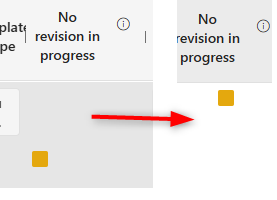
Top alignment of indicators
I don’t like the center alignment of the indicator fields in item lists.
/* Align indicators (red,yellow, green) in the center and top of an item list cell*/
.subelem-calculatedText--indicator  { vertical-align: top !important;}
.form-field-indicator {margin: 0 auto;}
ms-icon replaced with fluent
If you used HTML elements with ms-icons, you will need to look for a replacement with the new fluent icons.
Increase of choose fields to 4000 characters
Depending on your data the upgrade may take a while. If you have the option to do a test upgrade and want to take a note of the time the database upgrade took you can take a look at the table AdminDBMigrationLogs in the BPS_Config database.
Actions
Review attachment actions
We used attachment categories for some time and then got rid of them (1). Unfortunately, we didn’t update the actions. They still referenced the deleted attachments (2).
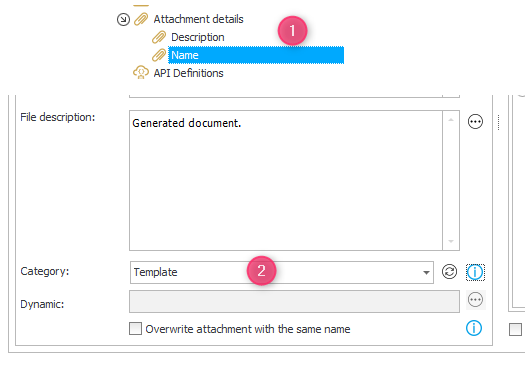
This was fine in 2023, but now caused errors like this:

I used this SQL to get all actions which are not using the Empty category option.
select actionProcess.DEF_ID, actionProcess.DEF_Name, automationProcess.DEF_ID, automationProcess.DEF_Name, ACT_AUTMID, AUTM_Name, ACT_ID, ACT_Name
from WFActions left join Automations on ACT_AUTMID = AUTM_ID left join WFDefinitions automationProcess on automationProcess.DEF_ID = AUTM_DEFID
left join WFDefinitions actionProcess on actionProcess.DEF_ID = ACT_DEFID
/* <newFileCategory><EmptyCategoryKey>#Empty</newFileCategory> is ok, but newFileCategory>1#Template</newFileCategory> needs to be verified */
where ACT_Configuration like '%newFileCategory>%' and ACT_Configuration not like '%newFileCategory>&%'
Changed default description value of uploaded attachments
I’m not sure whether this is related to 2026 but in 2023 attachments have been uploaded with an empty string value for description. In 2026 the default value is null.
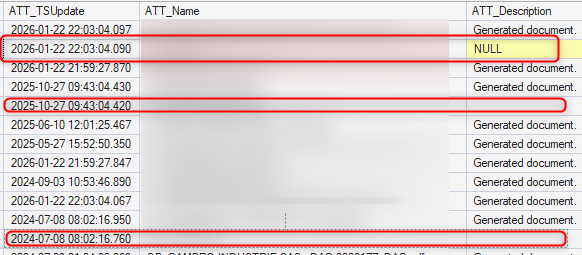
This caused a problem for us because we have hidden the Description value in the UI and used it to identify generated documents. This failed in 2026
Previous version
    select ATT_ID, ATT_IsDeleted, Att_Name
  from WFDataAttachmets
  where ATT_IsDeleted = 0
  and ATT_WFDID = '{86}'
  /* the generated template has a description but no other document */
  and ATT_Description = ''
New version makes use of isnull, so that it works with both variants.
  select ATT_ID, ATT_IsDeleted, Att_Name
  from WFDataAttachmets
  where ATT_IsDeleted = 0
  and ATT_WFDID = '{86}'
  /* the generated template has a description but no other document */
  and isnull(ATT_Description,'') = ''
I used this SQL to identify all actions in which the ATT_Description is used.
  select actionProcess.DEF_ID, actionProcess.DEF_Name, automationProcess.DEF_ID, automationProcess.DEF_Name, ACT_AUTMID, AUTM_Name, ACT_ID, ACT_Name
  from WFActions left join Automations on ACT_AUTMID = AUTM_ID left join WFDefinitions automationProcess on automationProcess.DEF_ID = AUTM_DEFID
  left join WFDefinitions actionProcess on actionProcess.DEF_ID = ACT_DEFID
  where ACT_Configuration like '%ATT_Description%'
SDK
Migration
Since WEBCON BPS 2024 any SDK needs to be rebuilt with the correct major release SDK. I’ve blogged about it here
DisplayName property is translated in SDKs
Up to WEBCON BPS 2025 the DisplayName property of the field always returned the label /prompt of the field. Starting with 2026 this is now translated.
logger.Log($"Adding sql field'{sqlField.DisplayName}' as placeholder");
We have been using the DisplayName as a placeholder in a multilingual environment. Our workaround was to create dedicated “placeholder” fields which may not be translated.
Comments