
Single row edit: Apply and add new
Overview
Adding the next/previous button to the single row editing modal has been one of my first user voices. I added this, after implementing something like it for a customer. Almost five years have passed since then and I didn’t realize that something was still missing. Why do you need to close the dialog, if you want to add a new row? Wouldn’t it improve the user experience to just add a new row from the modal? I gave it a shot, and while it’s not optimal, I think it’s ok. :)
Implementation
General
I’m not sure how often I’ve written this already, but it’s the same approach as always. :)
We need:
- A global form rule.
- An HTML field to pass some configuration
Global form rule
You can download the JS for this form rule from the repository and paste it to the new form rule. Don’t forget to switch the type to JavaScript mode.
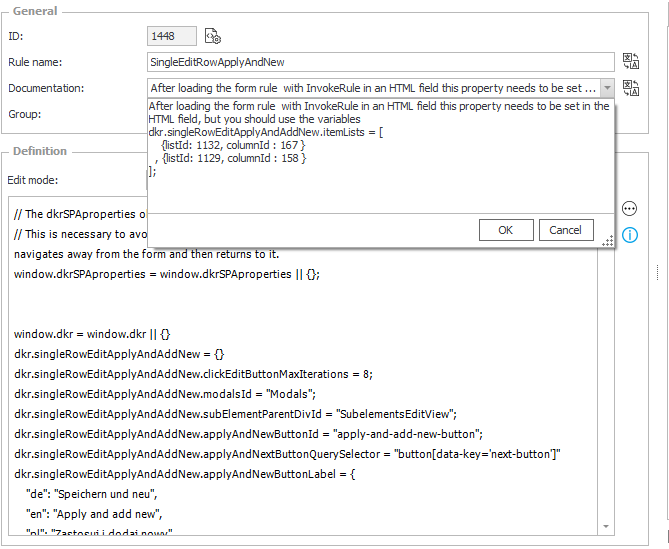
Rule name: SingleEditRowApplyAndNew
Edit mode: JavaScript mode
Description:
After loading the form rule with InvokeRule in an HTML field this property needs to be set in the HTML field, but you should use the variables instead of fixed ids.
dkr.singleRowEditApplyAndAddNew.itemLists = [
    {listId: 1132, columnId : 167 }
  , {listId: 1129, columnId : 158 }

];
HTML field
This is also simple, we need to load the form rule within an HTML field and set the properties to define, for which item lists the logic should be applied.
- Execute global form rule
TheInvokeRulewill load the global form rule and will monitor the form whether a modal dialog is displayed. - Define the item lists
You will need to add on JS object for each item list and you need to pass the integer ids not the database names:
{listId: #{WFCON:1132}#, columnId : #{DCN:167}# }
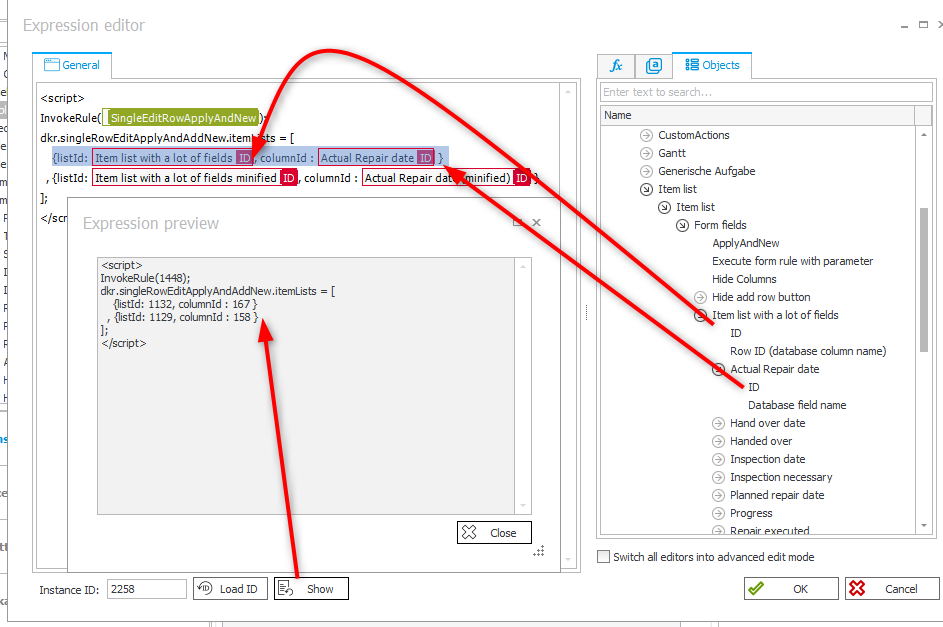
The HTML content of the example:
<script>
InvokeRule(#{BRUX:1448:ID}#);

dkr.singleRowEditApplyAndAddNew.itemLists = [
    {listId: #{WFCON:1132}#, columnId : #{DCN:167}# }
  , {listId: #{WFCON:1129}#, columnId : #{DCN:158}# }
];

</script>
Don’t forget to mark the HTML field as visible in the field matrix.
Usage
Once everything is set up, any modal dialog will be checked, whether it is for an item list. This is done by testing whether the Apply and next button exists. If this is the case, a new button will be added. If the button already exists, it’s visibility will be modified as described below.
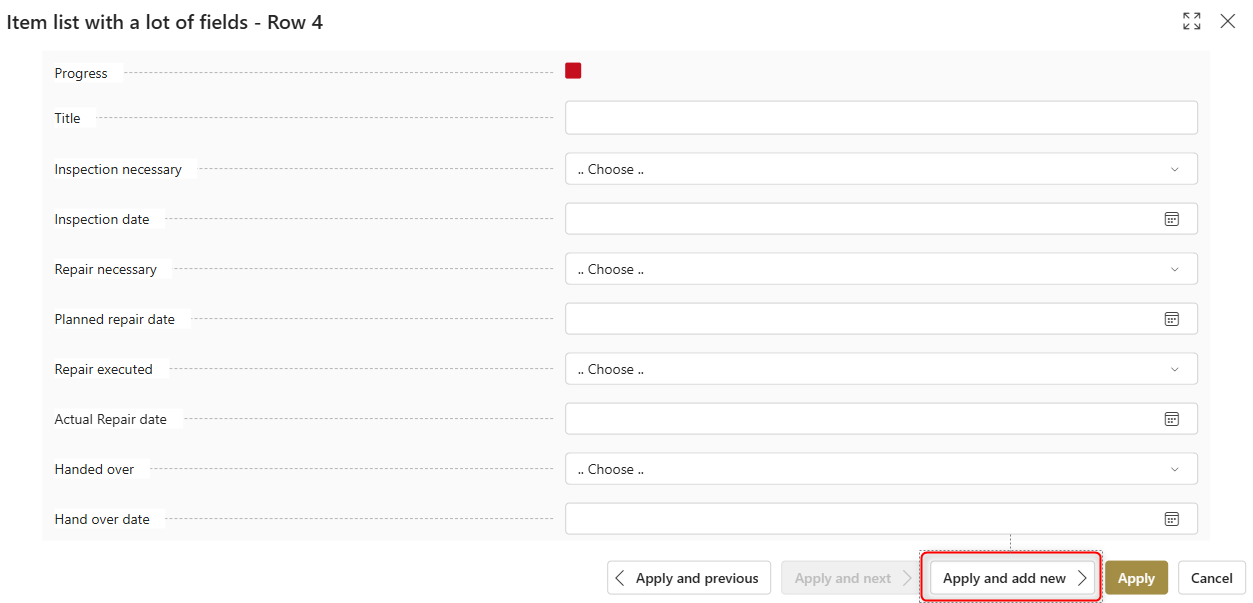
Apply and add new button has been added.
The button will behave differently depending on the context:
- If it’s not the last row, it will be disabled

- If it’s the last row it’s enabled

- It’s hidden if the
Addrow button is not displayed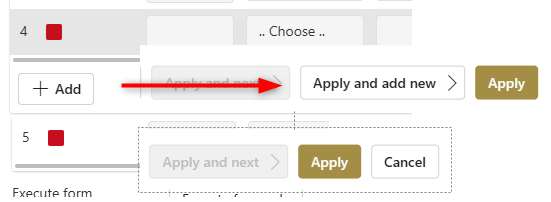
Explanations
How it works
If you have watched the video closely, you will have noticed that the dialog closed and has been opened again. This is exactly what the script does:
- Create a new row
- Click the
Applybutton - Click the
Pen(edit) button of the row
This also means, if you have any logic which would hide the Pen for a new row, this wouldn’t work.
I’m not really satisfied with this solution, but this is the only way it is working fine. I’m not satisfied because the animation during the closing/opening is annoying.
I tested another solution before:
- Create a new row
- Click the
Apply and nextbutton
This was working but it had two issues:
- The added row was referenced as row 0 in the header\

- The modal dialog wasn’t aware of the new row
TheApply and previousandApply and nextdid only navigate between the previously existing rows.
Why do we need the id of a column
The modal dialog does not contain any information about the item list in which context it was opened. Ok, that’s not completely correct. It does contain the database names and id of the displayed fields. Since the database names are not sufficient to identify the displayed item list, we need the id of a column.
Visibility of the new button
The visibility of the new button is defined by the function dkr.singleRowEditApplyAndAddNew.applyVisibility.
If you want to have a different behavior, you need to modify this function. For example, if you always want to display the button, and not only when the last row is displayed, you could just uncomment / remove these lines:
dkr.singleRowEditApplyAndAddNew.applyVisibility = function (currentItemListId, addApplyAndNewButton) {
    const addRowAllowed = document.querySelector(`div[id='SubElems_${currentItemListId}']  button.subelem-addRow`);

    if (!addRowAllowed) {
        addApplyAndNewButton.style.display = "none";

    }
    else {
        addApplyAndNewButton.style.display = "inherit";

        // // Enable or disable the button based on whether it's the last row
        // const modalHeader = document.querySelector(".modal-window__header");
        // let isLastRow = modalHeader.innerText.endsWith(" " + SubelementCountRows(currentItemListId));
        // if (isLastRow) {
        //     addApplyAndNewButton.classList.remove("button--disabled");
        //     addApplyAndNewButton.removeAttribute('disabled');

        // }
        // else {
        //     addApplyAndNewButton.classList.add("button--disabled");
        //     addApplyAndNewButton.setAttribute('disabled', 'disabled');

        // }
    }
}
Changing the label of the button
You can change the label of the button in the global form rule by modifying the applyAndNewButtonLabel label
dkr.singleRowEditApplyAndAddNew.applyAndNewButtonLabel = {
    "de": "Speichern und neu",
    "en": "Apply and add new",
    "pl": "Zastosuj i dodaj nowy"
}
Why can only five rows be added
I added a form rule in the advanced configuration of the item list which hides the Add row button, when there are five rows.
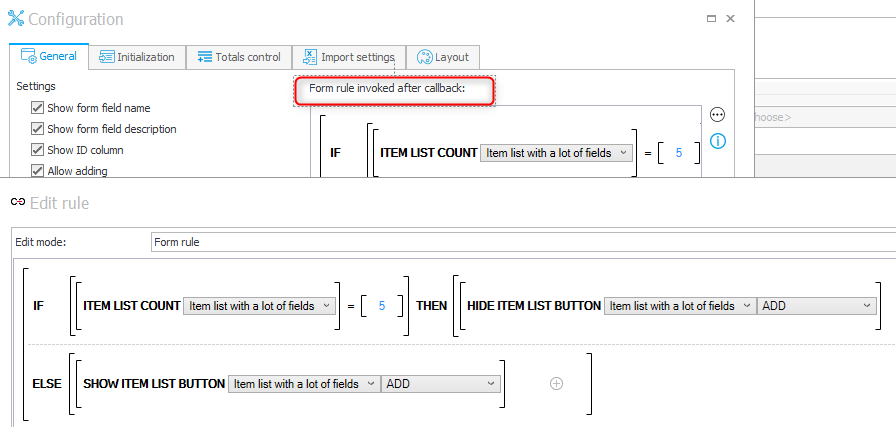
Add row button, when there are five rows
Download
You can find two different versions for WEBCON BPS 2025 and WEBCON BPS 2026 here.
Comments